HD Video Player All Formats
- 4.3
- Rating
- 100.00M
- Installs
- Free
- Price

 Analysis by App-foxy
When I need to check a video quickly, I want a player that opens the file without turning a simple viewing task into a project. HD Video Player All Formats is built around that practical need. It is a free Android video player in the Video Players & Editors category, developed by ASD Dev Video Player for All Format, and it also includes file-management and downloading tools. I found it most useful as a flexible media utility rather than as a full creative studio.
The app has been available since August 1, 2016, and its current release is v12.1.413 for devices running Android 6.0 or later. Its 4.4 average from around 334 thousand ratings and more than 100 million installs suggest that it has become a familiar option for people who want one app for everyday video playback. It is free to install, rated Everyone, and includes optional purchases ranging from $0.49 to $35.99 per item.
Starting with a creative file instead of a complicated workflow
My first impression is that this app makes more sense when a video already exists and I need to inspect, organize, or share it. It is not the place I would begin if I wanted to record a polished short film, build a timeline, add transitions, or create a finished social post. Instead, it works as the viewing and file-handling step before those tasks.
You May Also Like

 Blood Strike: 2.5 Anniversary
Blood Strike’s Loadouts Turn Every Drop Into a Tactical Gamble
A close look at Blood Strike’s custom loadouts: how fast access to signature weapons reshapes its battle royale rhythm, rewards preparation, and narrows the gap between fights.

 Pandora - Music & Podcasts
Pandora’s Music Is Easy to Start, but Harder to Recover
Pandora’s strength is its low-effort path from a seed to a station. Its weak spot is how much confidence it asks you to place in connection, setup, and quiet recovery.

 8 Ball Pool
 Is Built on Rivalries, Rematches, and Routine
A close look at the rivalries, rematches, shared routines, and unanswered safety questions that turn a quick pool match into a persistent mobile community.

 Samsung Music
’s Quiet Strength Is Playing What You Already Own
Its reach comes less from spectacle than from dependable access to a personal library. That simplicity is both the app’s strongest retention engine and its ceiling.

 AccuWeather: Weather Radar
AccuWeather Review: A Quick, Clear Forecast for Everyday Decisions
For everyday plans, the best forecast is the one you can understand quickly. AccuWeather makes rain timing, radar, and local conditions easy to act on, with a few trade-offs.

 Hill Climb Racing
Why Hill Climb Racing Still Turns Crashes Into One More Run
A tiny car, a bumpy hill and one more upgrade: Hill Climb Racing keeps resurfacing because its simple chaos makes every near-miss feel personal.
More From Our News Desk



That distinction matters for creators. A filmmaker checking camera clips, a student reviewing a presentation recording, or a small business owner checking a product video can open the material here and decide what deserves further work. The app’s focus on Full HD playback, MP4 support, MP3 playback, file management, and video downloading gives it a broad role around media, but those functions should not be confused with a dedicated editor.
I like this kind of starting point because it reduces unnecessary movement between apps. If a clip is stored somewhere inconvenient, a file manager can help locate it. If I only need to listen to the audio from a saved file, the player can handle that without forcing me into a music-focused application. For a quick review session, that combination is more useful than a long list of editing controls I may never touch.
The trade-off is that the broad feature set can make the experience feel less focused than a minimalist player. Someone who only wants a clean screen, a queue, and basic playback may find the extra file and download functions more than necessary. I would choose a simpler alternative for a family member who rarely handles local media and only watches videos from one familiar source.
How I use it during the making process
My practical workflow starts with a folder of clips. I open the player, locate the material, and watch each file before deciding whether it belongs in an edit, a presentation, or a final delivery folder. This is a small step, but it prevents a common mistake: importing several similar clips into an editor and only discovering later that one has the wrong framing, missing audio, or an unwanted section.
The file-management side is especially helpful when the phone contains downloads, camera recordings, screen captures, and received media mixed together. I can use the player as a first-pass inspection tool rather than opening every file through separate apps. That is one of the less obvious strengths here: it helps turn a messy phone library into a more workable shortlist before creative decisions begin.
For a realistic everyday example, imagine I have recorded a short product demonstration for a small online shop. Before sending it to an editor or uploading it, I would watch the complete clip on the phone, check whether the product stays visible, listen for interruptions, and compare it with the original intention. If the clip is fine, the app has done its job as a reliable checkpoint. If it needs trimming, captions, color correction, or music, I would move to a proper editing app afterward.
The same approach works for educational content. I can review a recorded lesson while commuting, identify the sections that need replacing, and make notes before opening a timeline editor. The player is therefore useful in the planning stage, even though it does not replace the actual production tools. I see it as a bridge between capturing media and making a finished piece.
One useful habit is to inspect both the beginning and the end of a file instead of watching only the first few seconds. A recording can look correct at the start and still have an abrupt cutoff, missing final audio, or an incomplete export. Using the player for this quick quality check is more valuable than relying on a file name or thumbnail.
Where playback helps and where it stops
The app’s promise of HD and 1080p playback makes it suitable for checking visual detail on a phone screen. That is useful when I need to examine whether text is readable, a face is in focus, or a product label is visible. It is not the same as professional color evaluation, though. A mobile display and ordinary viewing conditions cannot replace a calibrated monitor when accurate color or fine mastering decisions matter.
Audio playback also gives the workflow some flexibility. If I am checking a voice recording, interview, or soundtrack reference, I can listen without treating the file as part of a video-editing project. This is convenient for reviewing spoken clarity, but I would still use a dedicated audio editor when I need waveform editing, noise reduction, mixing, or precise level work.
The app’s wide role is best understood through small tasks: previewing a clip, locating a file, checking a finished export, or playing media during a review. It is less suitable for building a project from multiple sources. There is no reason to choose it over a timeline-based editor when the job involves arranging scenes, adding titles, balancing several audio tracks, or creating platform-specific versions.
Iteration, organization, and the handoff to finished work
When I move from a rough clip to a finished export, I find playback most valuable as a pause for checking rather than another step in editing. This section looks at how I use a separate viewing pass to catch practical issues, keep versions organized, and make a cleaner handoff. A little structure around those checks can save confusion when the work leaves my phone.
Using playback as an editing checkpoint
Although this is not an editor, it can still improve the editing process by making review more deliberate. After an export, I would open the new file here and watch it as a viewer rather than as the person who made it. That change in perspective often reveals mistakes that are easy to miss inside an editing interface, where the timeline and controls compete for attention.
I pay particular attention to three moments: the opening frame, the first spoken sentence, and the final seconds. The opening tells me whether the video begins cleanly. The first sentence exposes sync or volume problems quickly. The ending shows whether the export closes naturally or leaves a blank frame. These checks are simple, but they are concrete ways to use a player as part of a repeatable creative workflow.
For social content, I would also watch the file with the phone held in the same orientation I expect viewers to use. A video that looks fine in an editor can feel awkward when viewed vertically, horizontally, or with the device held at arm’s length. The player cannot fix framing, but it can expose the problem before publishing.
Another practical tip is to keep draft and final files visibly separate before opening them. A file manager is useful here, but the responsibility still belongs to me. Clear names such as “draft,” “review,” and “final” reduce the chance of sending an unfinished export. The app helps me access the files; it does not replace a disciplined naming system.
Downloading is a function that needs more care than ordinary playback. I would use it only for media I have permission to save and keep, and I would check the source’s rules before treating a downloaded file as part of a project. The presence of a downloader does not make every online video reusable. For creators, that distinction is important because a convenient workflow can still create copyright or licensing trouble if the source is ignored.
What happens when a file does not behave as expected
Compatibility is one of the main reasons people try a broad-format player, but “all formats” should not be treated as a guarantee that every file will behave perfectly on every phone. Playback can still depend on the video’s encoding, audio track, resolution, storage location, and the device itself. If a file stutters or refuses to open, I would first test another clip, confirm that the file is complete, and try moving it to local storage before blaming the player.
This is also where expectations matter. A phone that handles ordinary HD clips comfortably may struggle with unusually demanding material, especially if several apps are active or storage is nearly full. The app gives me a convenient place to test a file, but it cannot overcome every hardware limitation. For professional delivery checks, I would test the export on the actual target device or platform as well.
Privacy and clutter are worth considering in the day-to-day experience. A combined player, file manager, and downloader can be convenient, but it also means I should review what I open, save, and keep on the device. I prefer to remove temporary downloads after checking them and keep only the files that belong to an active project. That habit makes the app feel faster and keeps the media library manageable.
The optional purchases are another reason I would approach the app as a utility rather than assume every part of the experience is identical for every user. The basic app is free, while in-app items range from $0.49 to $35.99 each. I would use the free version first, identify whether it handles my normal files comfortably, and only then decide whether any optional item is worthwhile. There is no need to pay simply because a feature appears in the interface.
Preparing a clean handoff
When a video is ready to send to someone else, I use the player for one last inspection. I check that the file opens from the location where I plan to share it, that the sound is present, and that the picture remains stable through the middle and ending. This is especially useful when a file has been moved, renamed, or downloaded from another device.
For a client or collaborator, I would not treat the app as the delivery platform itself. I would use it to verify the file, then hand it off through the agreed storage or messaging method. That separation keeps the workflow clear: the player is the quality-control station, while the chosen sharing service handles access and communication.
It is also a good place to compare two exports side by side in a practical sense. I can open one version, note a problem such as weak dialogue or an incorrect crop, then check the revised file. The app does not provide the editing history, but it helps me judge the result without being distracted by the controls of the editor that created it.
For creators who publish regularly, I would make this review routine part of the handoff checklist. Watch the full file once, verify the first and last moments again, confirm the intended orientation, and make sure the selected file is the final version. That process takes longer than trusting a thumbnail, but it can prevent an embarrassing upload.
Who should choose it, and who should skip it
I would recommend this app to Android users who keep videos locally, receive media from different sources, or want playback and file handling in one place. It is also a sensible companion for people who frequently review drafts on a phone before sending them to an editor, client, teacher, or social platform. The combination is more valuable to active media users than to someone who watches only through one streaming service.
I would be more cautious about recommending it to a creator who needs a complete production environment. If your work depends on trimming, multi-track editing, subtitles, transitions, keyframes, effects, detailed color work, or controlled export settings, you should start with a dedicated editor. A desktop media player may also be better when you need a large-screen review, keyboard shortcuts, or a more formal library workflow.
It is also not my first choice for people who want a highly curated media library with sophisticated playlists, synchronized viewing history, or a polished home-theater interface. This app’s strength is practical access to files, not elaborate cataloging. Its usefulness grows when I have media to inspect and manage; it does not automatically improve a simple streaming-only routine.
For Android compatibility, the minimum requirement of Android 6.0 keeps the app accessible to many older devices, while the current v12.1.413 release gives users a contemporary version to try. I would still judge the experience on the specific phone, because playback smoothness and storage behavior can vary across hardware. The Everyone age rating also makes it broadly approachable, though downloaded content itself may still deserve individual judgment.
My creator-focused verdict
After using it as a working media tool, I see HD Video Player All Formats as a practical checkpoint between raw footage and finished delivery. It helps me open clips, inspect exports, listen to audio, locate files, and manage a few common media tasks without requiring a full editing suite. That is a useful role, especially when the phone is where the review happens.
Its biggest advantage is not any single playback claim. It is the way the player, file manager, and downloader can support a short workflow from finding a clip to deciding what happens next. The less obvious benefit is the discipline it encourages: preview before editing, review exports outside the editor, and verify the exact file before handoff.
The limitations are equally clear. It is not a replacement for a timeline editor, a professional audio tool, a desktop review system, or a carefully managed publishing platform. The broad feature set may feel busy, and optional purchases mean I would test the free experience before spending anything. Downloading also requires responsible source and copyright decisions.
Overall, I would keep it on an Android phone used for regular media work, particularly when I need a quick way to inspect local videos and audio. I would not build an entire creative pipeline around it, but I would gladly use it at the beginning and end of that pipeline. For a free utility with a 4.4 average and over 100 million installs, it has earned its place as a convenient everyday viewer, provided I understand that its job is to help me review and manage content rather than create the finished piece.
FAQs for HD Video Player All Formats
01What video formats are supported by HD Video Player All Formats?
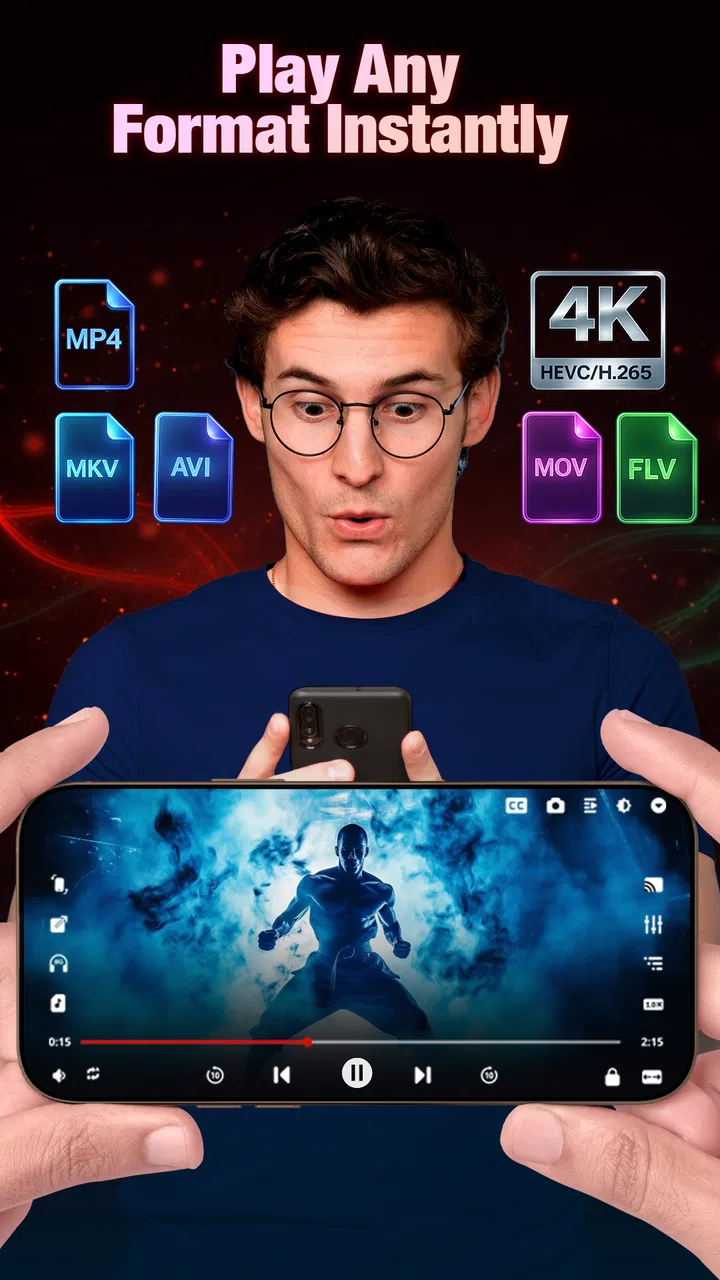
HD Video Player All Formats supports a wide range of video formats, including MP4, AVI, MKV, FLV, WMV, and MOV. This makes it an excellent choice for users who need flexibility in playing different types of video files without having to convert them first.
02Does HD Video Player All Formats support subtitle files?
Yes, the app supports multiple subtitle formats such as SRT, SUB, and ASS. You can easily load these files, adjust the sync if needed, and customize the appearance of the subtitles for a more personalized viewing experience.
03Is HD Video Player All Formats free to use?
The app offers a free version with basic features, but there may be in-app purchases or ads. For an ad-free experience and advanced features, users can opt for the premium version, which usually comes with a one-time fee or subscription model.
04What are the system requirements for installing HD Video Player All Formats?
HD Video Player All Formats requires Android 5.0 and up or iOS 11.0 and later. Ensure that your device has enough storage space and a stable internet connection for downloading and updating the app. Check the app store for specific compatibility with your device model.
05How user-friendly is the interface of HD Video Player All Formats?
The app boasts a clean and intuitive interface, making it easy to navigate even for beginners. Features like gesture controls for volume and brightness adjustment, and a simple file manager for browsing videos, contribute to a seamless user experience. The app is designed to be both functional and aesthetically pleasing.
Pros
- Supports all popular video formats seamlessly.
- Offers high-quality video playback in 4K.
- User-friendly interface with easy navigation.
- Includes subtitle support for multiple languages.
- Customizable playback speed and screen ratios.
Cons
- Contains ads that can interrupt viewing.
- Limited advanced audio settings options.
- No built-in video editing features.
- Requires in-app purchases for premium features.
- May not support older device models.

HD Video Player All Formats
Gallery